An alternative to the iOS keyboard.
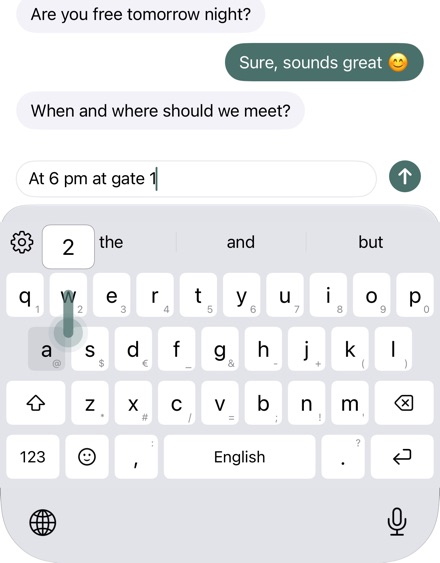
Kyrrkey types the way you know from iOS and saves you steps: digits and symbols with a swipe, deleting with a drag, snippets with a shortcut. All without internet access.
What stays the same
Suggestions, autocorrect, swipe typing, emoji with search, accents by holding a key, the cursor on the space bar and your text replacements from iOS. English, German, French and Norwegian with the layouts of iOS, plus Colemak and Dvorak.
What you gain
Swipe up on a key for the capital letter, down for digits and symbols. Drag ⌫ to the left to delete, drag back to bring the text back. If you like, a number row and an editing bar with arrow keys. Plus snippets by shortcut, your own gestures, themes and sounds.
Switch in three steps
Download Kyrrkey, open it and tap “Open iOS Settings”. There, tap “Keyboards” and turn on Kyrrkey. In a text field, hold the globe and choose Kyrrkey. The iOS keyboard stays installed; the globe takes you back at any time.
What iOS sets for every keyboard
In password and phone number fields and in some apps, iOS always uses its own keyboard. Selecting text and dictation are not possible for any third-party keyboard.
Try and buy
Try everything free for 30 days, with no subscription and no payment details. Then buy once, with Family Sharing. Without buying, Kyrrkey keeps typing like the iOS keyboard: with suggestions, autocorrect, swipe typing and emoji.