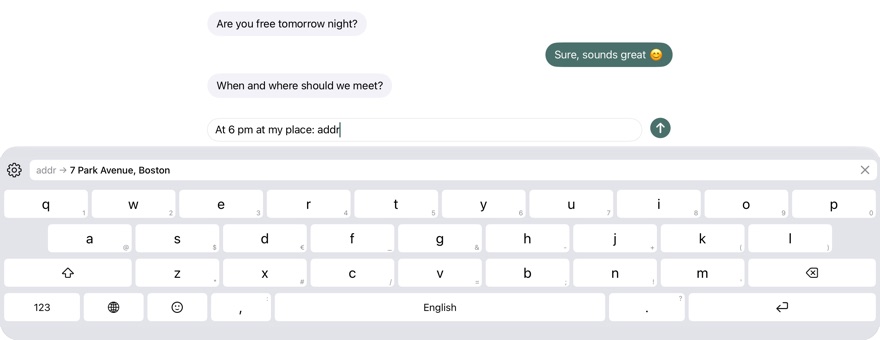
Long texts with a shortcut.
Your address, an email signature, replies you often send: type a shortcut and the whole text is there.
How it works
In the keyboard, under the gear › “Snippets”, add a text and give it a shortcut, such as “addr” for your address. When you type the shortcut, the suggestion bar shows the text; a tap puts it in. If you like, Kyrrkey replaces the shortcut automatically as soon as you type a space or punctuation. ⌫ right after brings the shortcut back.
Your iOS text replacements
If you like, Kyrrkey uses the text replacements from iOS Settings like your own shortcuts. This works without buying, too.
Stored encrypted
Snippets are encrypted on the device and excluded from backups. Kyrrkey contains no networking code. They reach your other devices only if you turn on syncing through iCloud Keychain; iOS then syncs them with end-to-end encryption.
Try it
Snippets are part of the full version. Try everything free for 30 days, with no subscription and no payment details. Then buy once, with Family Sharing.